Subcontractor Compliance Tracker User Guide
Find your question, then follow the steps: which tab to open, which cell to type in, and what you should see when it worked. Words in bold are the exact tab, column or button names in the workbook.
Published by PoshJosh LLC · Updated October 27, 2026
About this guide
This guide is for the Subcontractor Compliance Tracker, template edition, for up to 15 subs, in Excel and Google Sheets. Your files are Subcontractor_Compliance_Tracker_Template_SAMPLE.xlsx and Subcontractor_Compliance_Tracker_Template_BLANK.xlsx.
It needs Excel 2019 or later, or Microsoft 365, on Windows or Mac, or free Excel for the web. Excel 2016 or earlier shows #NAME? errors.
Color key
| Cells | What they mean |
|---|---|
| Shaded | Inputs. Type here or pick from a dropdown. |
| White | Formulas. They calculate on their own and are protected from accidental typing. |
Your two files. The SAMPLE is filled for Gulf Prairie Builders, a fictional general contractor, with 15 subs showing every status. Two of them are deliberate problem rows: Angleton Glass shows a data error and Lake Jackson Landscaping shows a missing profile. The BLANK has five starter profiles and no subs, ready for your business.
What it does, and doesn't do. The workbook records what you enter and checks it against requirements you set. It does not verify insurance, give legal or tax advice, or decide whether a sub may work or be paid. Confirm your requirements with your insurance agent and attorney. Your files stay in Excel or your own Google Drive; nothing is sent anywhere.
Need help? Message the shop on Etsy. Say which tab and row you were on, what you typed, and what you expected to see.
Getting around
The workbook has eight tabs. You set your rules once on Requirements, then keep Subs, Coverage and Licenses up to date as paperwork comes in. Requirement Status and Dashboard do the checking.
| Tab | What lives there | You type here? |
|---|---|---|
| Start Here | Instructions, settings (Review Date, time zone), status meanings, data health checks | Settings only |
| Dashboard | Status counts, review queue, chase list, policy and license watchlists | No |
| Subs | One row per subcontractor: profile, contact, W-9 and agreement dates, and their Status and Reason | Yes |
| Requirement Status | Each requirement's state for every sub | No |
| Licenses | One row per license | Yes |
| Coverage | One row per insurance policy, typed from the certificate | Yes |
| Requirements | Your profiles (left) and the coverage rules for each profile (right) | Yes |
| Overrides | Temporary exceptions, with a reason, approver and end date | Yes |
Each entry tab keeps its header row and first columns in place as you scroll. Hidden columns on the right of Subs, Coverage and Licenses hold working formulas; leave them hidden.
How do I…?
The short path for each common task. The section in the last column has the full steps.
| How do I… | Short path | Section |
|---|---|---|
| Set what each kind of sub must carry | Requirements → a profile (left) and its coverage rows (right) | First-time setup |
| Add a subcontractor | Subs → next empty row | Add a subcontractor |
| Record a certificate of insurance | Coverage → one row per policy | Enter a certificate |
| Record a renewal | Coverage → a new row; keep the old one | Enter a certificate |
| Record a license | Licenses → next empty row | Licenses and overrides |
| Record a W-9 or signed agreement | Subs → W-9 Received Date or Agreement Signed Date | Add a subcontractor |
| Allow a temporary exception | Overrides → next empty row | Licenses and overrides |
| See who needs attention | Dashboard → review queue | Use the Dashboard |
| See what to request from each sub | Dashboard → chase list | Use the Dashboard |
| See what expires soon | Dashboard → policy and license watchlists | Use the Dashboard |
| Find out why a sub isn't passing | Subs → Reason, or Requirement Status | What each status means |
| Check the statuses as of another date | Start Here → Review Date override | Use the Dashboard |
| Retire a sub who's finished | Subs → Active = No | Add a subcontractor |
| See one sub go from Needs Attention to passing | SAMPLE → Coastal Plumbing → add its workers comp policy | Walk through the SAMPLE |
No match. Try a shorter word, or message the shop on Etsy.
First-time setup
Setup is where you write down your rules: which documents each kind of sub must have, and the insurance limits and endorsements your agent or contracts require. Do it once, before you enter subs.
Open the right file
- Open Subcontractor_Compliance_Tracker_Template_BLANK.xlsx in Excel. For Google Sheets, see Google Sheets edition below.
- If a yellow bar says Protected View, click Enable Editing so the dropdowns work.
- Save it under your own name.
For Excel for the web, upload the file to your OneDrive first, then open it from there.
Settings on Start Here
| Setting | What to enter |
|---|---|
| Review Date override (C5) | Leave blank. Statuses are then as of today. See Use the Dashboard for when to use it. |
| Default override length (days) (C7) | How long an override lasts when it has no End Date. Starts at 30. |
| Company time zone (C8) | Your time zone, for your records |
| Hours ahead of this computer (C9) | 0, unless this computer's clock is set to a different time zone from the company. Example: 1 for an Eastern company on a Central computer; behind is negative. |
Profiles (Requirements, left table)
A profile is a set of rules for one kind of sub, such as a general trade or a materials supplier. The BLANK starts with five: GEN General Trade, LVE Limited Vehicle Exposure, SUP Materials Supplier, PRO Professional Services and CUST Custom. Up to 12 fit.
For each profile you'll use, fill:
| Column | What to enter |
|---|---|
| W-9 Required, Agreement Required, License Required | Yes or No |
| Expiring Soon Days | How many days ahead to warn before something expires. Starts at 30. |
| Required License Type and Required License State | Only when a specific license is required, for example Electrical Contractor, TX. Leave blank to accept any current license on record. |
| Coverage Types Reviewed | Yes, once you've set up its coverage rows on the right |
Until those are filled, the profile counts under Profile rows with errors on Start Here.

Coverage rules (Requirements, right table)
Add one row per profile and coverage type that has a rule. A coverage type with no row is Not Required. Up to 60 rows fit.
| Column | What to enter |
|---|---|
| Profile ID | The profile this rule belongs to |
| Coverage Type | General Liability, Auto, Workers Comp, Umbrella or Excess, Professional, Pollution or Other |
| Requirement | Required, Optional or Not Required |
| Min Each Occurrence, Min Aggregate, Min Auto CSL, Min EL Each Accident, Min EL Disease Each Employee, Min EL Disease Policy | Minimum limits in dollars; leave blank where there's no minimum |
| Additional Insured, Waiver of Subrogation, Primary Noncontributory | Required or Not Required |
| Excess Allowed | Yes if an umbrella may make up a short limit |
| Occurrence Form, Per-Project Aggregate | Required or Not Required |
For example, the SAMPLE's GEN profile requires General Liability at 1,000,000 each occurrence and 2,000,000 aggregate with all three endorsements, Auto at 1,000,000 CSL with additional insured, and Workers Comp at 1,000,000 for each employer's liability limit with a waiver of subrogation. Umbrella is Optional.
What you should see: the Profile Check and Requirement Check columns stay blank. Take your agent's or contract's requirements as the source; the workbook only checks against what you enter.

Add a subcontractor
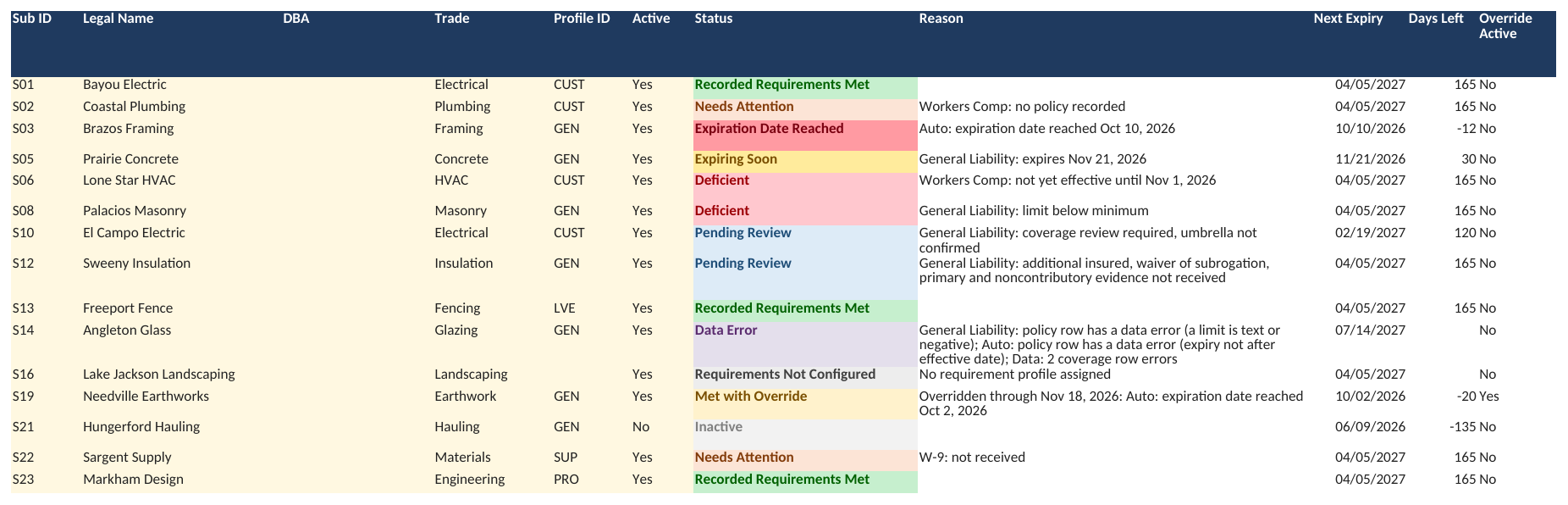
Give each sub one row on Subs. Their Status and Reason appear as soon as you assign a profile, and update as you add their certificates and licenses.
- Go to the first empty row on Subs (rows 5 to 19).
- Fill the shaded columns:
| Column | What to enter | Example |
|---|---|---|
| Sub ID | Your own short code, unique for each sub | S01 |
| Legal Name | Exactly as on their W-9 | Bayou Electric |
| DBA | Their trade name, if different | |
| Trade | Pick from the list | Electrical |
| Profile ID | Pick the profile that fits this sub | GEN |
| Active | Yes, or No when they're finished; blank counts as Yes | Yes |
| Contact Name, Email, Phone | Who to chase for paperwork | |
| W-9 Received Date | The date you received their W-9 | 3/2/2026 |
| Tax Classification | From their W-9 | LLC (S) |
| Agreement Signed Date | The date they signed your subcontract agreement | 3/5/2026 |
What you should see: Status, Reason, Next Expiry, Days Left and Override Active fill in. A new sub usually shows Needs Attention until you add their policies on Coverage.
Rules worth knowing
- IDs aren't case-sensitive and can't contain *, ? or ~.
- Type dates as the date only. A date pasted with a time of day (such as 4/5/2027 2:30 PM) makes the row a Data Error until you retype the date alone.
- When a sub is finished, set Active to No rather than deleting the row. Their history stays, and they drop off the Dashboard.
- The template edition holds 15 subs. Requirement Status lists the first 15 only.
Enter a certificate
Type each policy from the certificate of insurance as one row on Coverage. A certificate listing three policies (say general liability, auto and workers comp) is three rows. Up to 75 policies fit.
The basics
| Column | What to enter |
|---|---|
| Policy ID | Your own unique code for this row |
| Sub ID | The sub it belongs to |
| Coverage Type | General Liability, Auto, Workers Comp, Umbrella or Excess, Professional, Pollution or Other |
| Carrier, Policy Number | As printed |
| Named Insured | Exactly as printed on the certificate |
| Policy Form | Occurrence or Claims-made |
| Retro Date | For a claims-made policy |
| Effective Date, Expiry Date | As printed |
| Ends At | 12:01 a.m., or 11:59 p.m. only if the policy says it ends then |
| Cancellation Date | Only if you've been told it was cancelled |
| Certificate Date | The date on the certificate |
Then the limits that apply to that policy, in dollars: Each Occurrence or Claim, Aggregate, Auto CSL, EL Each Accident, EL Disease Each Employee, EL Disease Policy, and Per-Project Aggregate (Yes or No).
What you should see: Row Status, Used for Status, Days Left and Issues fill in, and the sub's Status on Subs updates.

Expiration dates
A policy reaches its expiration date at 12:01 a.m. on the printed expiry date, when most policies end. If the policy says it ends at 11:59 p.m., pick that in Ends At and it counts as in force through that day. Days Left always shows the printed date.
Renewals
When a renewal arrives, add it as a new row and keep the old one as history.
- Every policy in force is checked, and the best result counts. Used for Status marks the policy that counted.
- Policies that have ended while another is in force show Superseded.
- A renewal entered before it starts that meets every requirement stops the Expiring Soon warning. Issues shows renewal on file, effective and its date.
- A policy that starts after the earlier one ended is flagged as a gap in coverage in Issues.
Named insured
If the Named Insured matches neither the sub's Legal Name nor DBA (ignoring case, spaces and punctuation), that coverage is Pending Review. If it's a legitimate variant, such as Inc for Incorporated, two named insureds, or c/o text, set Named Insured Reviewed to Yes and fill NI Reviewed By and NI Reviewed Date to accept it.
Endorsements
For additional insured, waiver of subrogation and primary noncontributory, there are two kinds of columns:
| Columns | What they record | Satisfies the requirement? |
|---|---|---|
| Additional Insured on Certificate, Waiver of Subrogation on Certificate, Primary Noncontributory on Certificate | What the certificate shows (Yes or No) | No; shown without evidence is Pending Review |
| AI Evidence Date and By, WOS Evidence Date and By, PNC Evidence Date and By | That you have the endorsement itself, when and who checked it | Yes, when dated on or before the Review Date |
Umbrella or excess
An umbrella can make up a short limit, but only when all of these hold: it's in force; Excess Confirmed is Yes with Confirmed By and Confirmed Date filled; it's marked Yes for that coverage in Excess Over General Liability, Excess Over Auto or Excess Over Workers Comp; and the requirement row has Excess Allowed = Yes. Its Each Occurrence adds to the occurrence, auto and employer's liability limits; its Aggregate adds to the aggregate and disease policy limits.
Workers comp other than insurance
Pick the arrangement in WC Arrangement: Insurance, Approved self-insurance, DWC coverage agreement, Non-subscriber or Other. For anything other than insurance, enter the period you accepted it for as the Effective Date and Expiry Date, set WC Documentation to Received or Missing, and record your WC Reviewer Decision: Accepted, Rejected or Pending. Limits and endorsements aren't checked for these; your decision is.
A DWC coverage agreement is a signed DWC Form-81, -82, -83 or -84 that places the sub's people under another employer's workers comp policy. Record the form in Evidence Reference.
This edition has no jobs, so it does not apply the stricter workers comp rule for public projects (Texas Labor Code 406.096; 28 TAC 110.110).
Licenses and overrides
Record a license
Add one row per license on Licenses (up to 30).
| Column | What to enter | Example |
|---|---|---|
| License ID | Your own unique code for this row | L01 |
| Sub ID | The sub it belongs to | S01 |
| License Type | As issued | Electrical Contractor |
| Issuing Authority | Who issued it | TDLR |
| License Number | As issued | |
| State | Two-letter state | TX |
| Expiry Date | As printed | 4/5/2027 |
| License Notes | Anything else (optional) |
What you should see: License Status and Days Left fill in, and Row Error stays blank.
- A license reaches its expiration date on its expiry date.
- A later license of the same type and state for the same sub supersedes the earlier one, so add renewals as new rows.
- If the sub's profile names a Required License Type and State, that license is what's checked. If the profile requires a license but names neither, every current license on record counts and the worst one decides.
Allow a temporary exception
An override lets a sub pass on one item for a limited time, for example while a renewal certificate is on its way. Add a row on Overrides (up to 15):
| Column | What to enter |
|---|---|
| Override ID | Your own unique code |
| Sub ID | The sub |
| Item | The item being excused: a coverage type, License, W-9 or Agreement |
| Reason | Why, in plain words |
| Approved By and Approval Date | Who approved it, and when |
| End Date | When it stops. Blank uses the Default override length (days) on Start Here. |
| Override Notes | Anything else (optional) |
What you should see: Override Check stays blank, Active shows the override is on, and the sub's status becomes Met with Override if that was its only problem. The Reason still shows the underlying problem and the override's end date.
An override with an error in Override Check is ignored.
What each status means
Every sub gets one Status on Subs: the worst state among their requirements. The Reason next to it says, in plain words, what caused it, for example Workers Comp: no policy recorded.
Statuses, worst first
| Status | Means | SAMPLE example |
|---|---|---|
| Requirements Not Configured | No profile, or a profile not on Requirements. Never a pass. | Lake Jackson Landscaping: no requirement profile assigned |
| Data Error | A date, limit or ID that can't be read. The bad row is left out of every check until fixed. | Angleton Glass: a limit is text or negative |
| Expiration Date Reached | A required policy or license reached its expiration or cancellation date | Brazos Framing: Auto expired Oct 10, 2026 |
| Deficient | A limit or endorsement is short, claims-made where occurrence is required, no per-project aggregate where required, a policy not yet effective, or a rejected workers comp arrangement | Palacios Masonry: General Liability limit below minimum |
| Needs Attention | A required policy, license, W-9 or agreement isn't recorded | Sargent Supply: W-9 not received |
| Pending Review | Recorded, but waiting on you: endorsement evidence, umbrella confirmation, a named insured that doesn't match, policy form, retro date or per-project aggregate not recorded, or a workers comp arrangement not yet accepted | Sweeny Insulation: endorsement evidence not received |
| Expiring Soon | Everything passes, but something expires within the profile's Expiring Soon Days | Prairie Concrete: General Liability expires Nov 21, 2026 |
| Met with Override | Passes only because an active override removes an item | Needville Earthworks: overridden through Nov 18, 2026 |
| Recorded Requirements Met | Your recorded entries meet your checks | |
| Inactive | Active is No. Left out of the Dashboard. |
A passing status means your recorded entries meet your checks. It doesn't mean the coverage, endorsements or legal compliance were verified.
Requirement Status tab
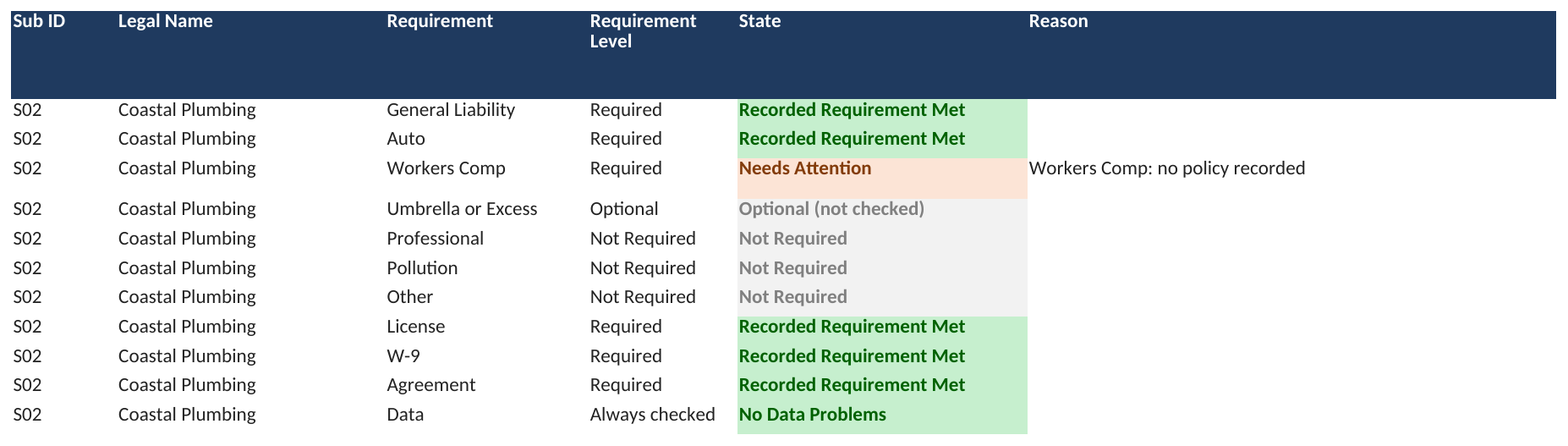
Requirement Status has one row per sub and requirement: each coverage type, the license, the W-9 and the agreement. Its State and Reason columns show exactly which requirement is holding a sub back. Nothing is typed there. It lists the first 15 subs.
Use the Dashboard
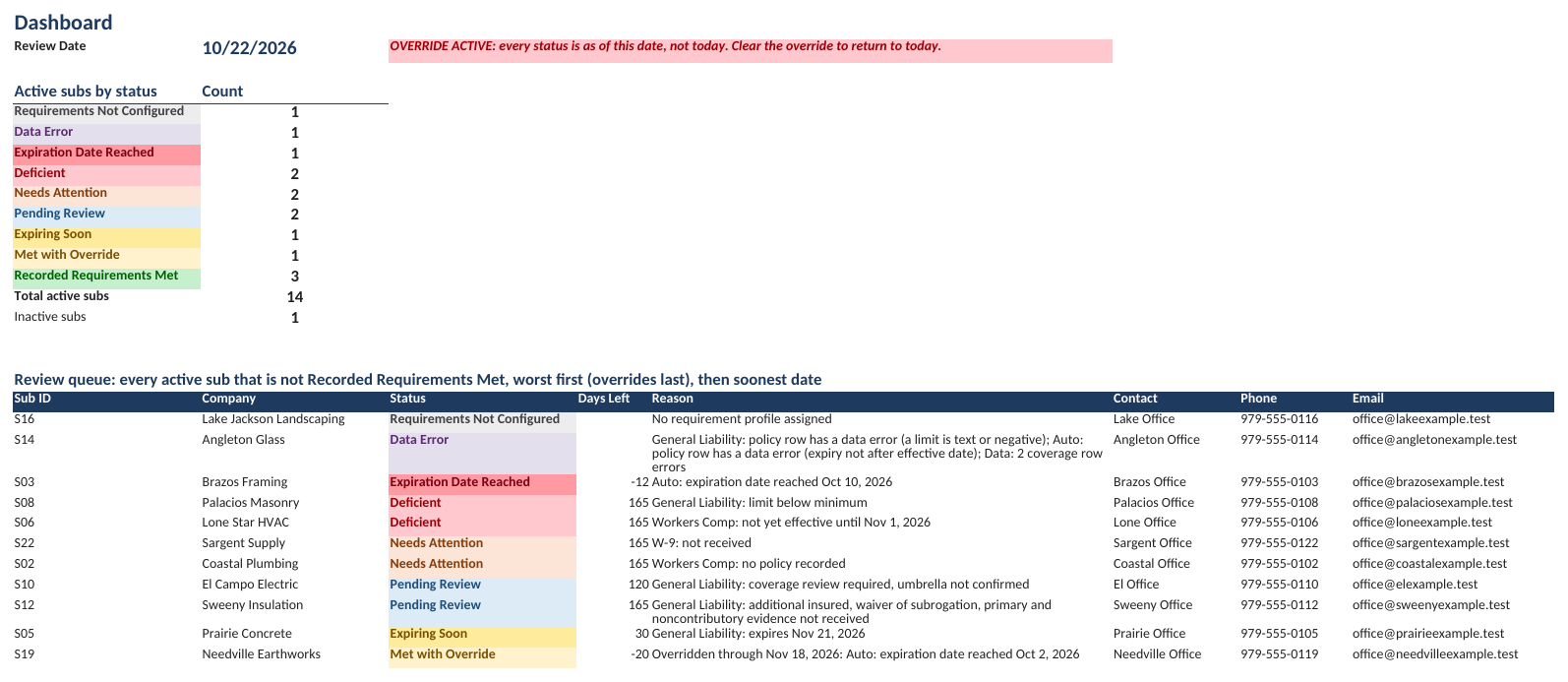
The Dashboard is your weekly to-do list. Nothing on it is typed; it updates from the other tabs. Read it top to bottom.
| Section | What it shows | Use it to |
|---|---|---|
| Active subs by status | A count for each status, plus Total active subs and Inactive subs | See the overall picture (SAMPLE: 14 active, 3 met, 1 inactive) |
| Review queue | Every active sub that isn't Recorded Requirements Met, worst first (overrides last), then soonest date, with the Reason and contact details | Decide who to deal with first |
| Chase list | Subs who owe you a document: missing, expiration date reached, short or expiring soon, with What to request | Call or email for paperwork |
| Policy watchlist | Policies that reached their expiration date, were cancelled, or expire within the profile's window | Ask for renewals before they lapse |
| License watchlist | Licenses that reached their expiration date or expire within the window | Ask for license renewals |
What you should see in a healthy workbook: few rows in the review queue, and the watchlists showing only what's coming up.
Review Date
The Review Date at the top is the date every status is worked out for. Normally it's today.
To see every status as of another day, for example to check what will have expired by the start of a job next month, type that date in Review Date override on Start Here (C5). The Dashboard then shows OVERRIDE ACTIVE: every status is as of this date, not today. Clear C5 to return to today.
The SAMPLE's override is set to Oct 22, 2026, the date its data was written for, so its statuses stay the same.
Data health checks
The Data health checks box on Start Here counts entries the workbook can't use. Every count should read 0; a non-zero line points to the tab and column to fix. The SAMPLE reads above 0 on three lines on purpose, from its two problem rows (Angleton Glass and Lake Jackson Landscaping).
| Check | Where to look and what to do |
|---|---|
| Subs with a data problem | Duplicate Sub IDs, unreadable dates or bad Active values. See the Status column on Subs. |
| Subs without a usable profile | Assign a Profile ID that exists on Requirements. |
| Coverage rows with errors | Filter Row Status on Coverage for Data Error; the Issues column says why. |
| Coverage rows for an unknown sub | The Sub ID isn't on Subs; correct it or add the sub. |
| License rows with errors | See the Row Error column on Licenses. |
| Profile rows with errors | See Profile Check on Requirements. In a new workbook this counts the starter profiles until their Yes/No settings and Coverage Types Reviewed are filled in. |
| Requirement rows with errors | See Requirement Check on Requirements. |
| Override rows with errors | See Override Check on Overrides. An override with an error is ignored. |
| Subs past the Requirement Status capacity | Requirement Status shows the first 15 subs. Extra subs still get a Status but aren't listed there. |
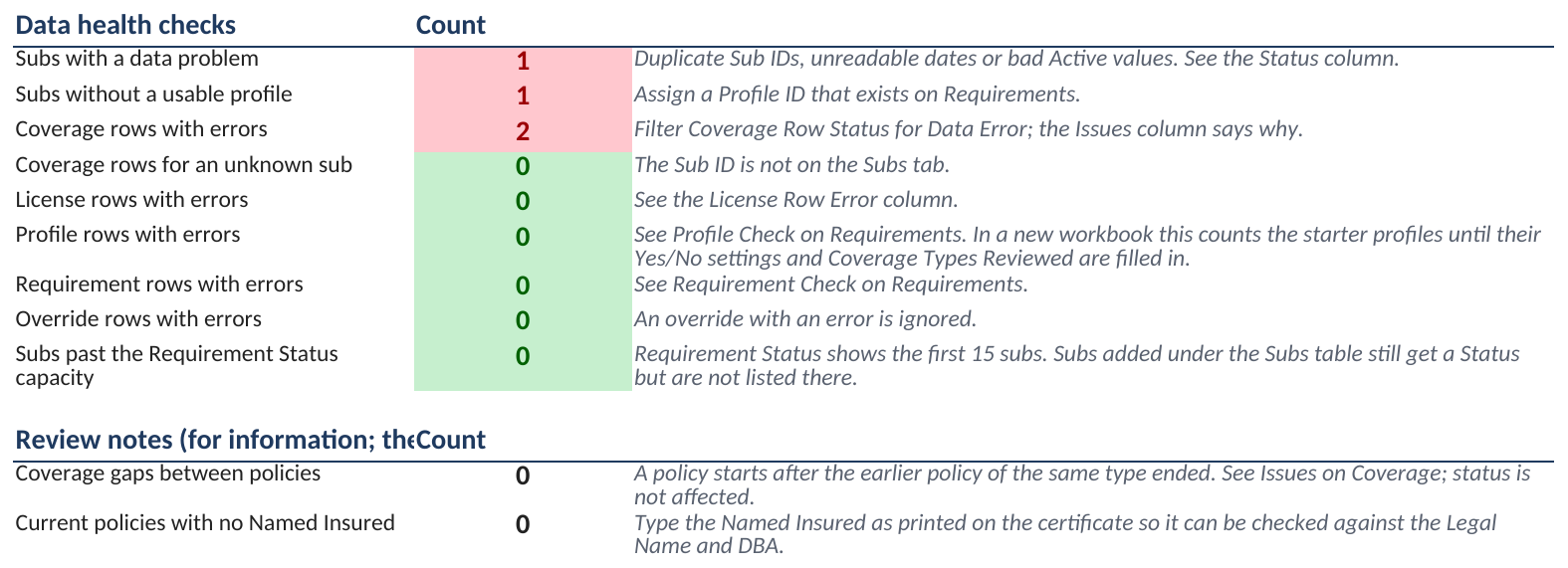
Below that, Review notes are for information and needn't read 0:
- Coverage gaps between policies: a policy starts after the earlier policy of the same type ended. See Issues on Coverage; the status isn't affected.
- Current policies with no Named Insured: type the Named Insured as printed so it can be checked against the Legal Name and DBA.
Common data errors
| Cause | Fix |
|---|---|
| A date pasted with a time of day | Retype the date alone |
| A limit typed as text, such as "1M" or "$1,000,000 CSL" | Type the number only: 1000000 |
| An expiry date not after the effective date | Correct one of the dates |
| An ID with *, ? or ~ | Remove the character |
Walk through the SAMPLE
Follow one sub from Needs Attention to passing. Use the SAMPLE file; nothing you change there touches your own work.
Coastal Plumbing (Sub ID S02, profile CUST) has its general liability, auto, license, W-9 and agreement on record, but no workers comp policy. Its profile requires workers comp at $1,000,000 for each employer's liability limit, with a waiver of subrogation.
- Open Subs and find Coastal Plumbing in row 6. Status reads Needs Attention and Reason reads Workers Comp: no policy recorded.

- Open Coverage and go to the first empty row (row 46). Type the policy from its certificate: Policy ID P046, Sub ID S02, Coverage Type Workers Comp, Carrier Fictional Mutual, Policy Number FM-00046, Named Insured Coastal Plumbing, Effective Date 4/5/2026, Expiry Date 4/5/2027 and Certificate Date 4/5/2026.
- In the same row, type 1000000 in EL Each Accident, EL Disease Each Employee and EL Disease Policy.
- Set Waiver of Subrogation on Certificate to Yes, and fill WOS Evidence Date 4/25/2026 and WOS Evidence By J. Reviewer: you have the endorsement itself, not only the certificate. Set WC Arrangement to Insurance and type COI-S02-46.pdf in Evidence Reference.
What you should see: the new row's Row Status reads In Force, Used for Status Yes and Days Left 165.

- Go back to Subs.
What you should see: Coastal Plumbing's Status is Recorded Requirements Met and its Reason is blank.

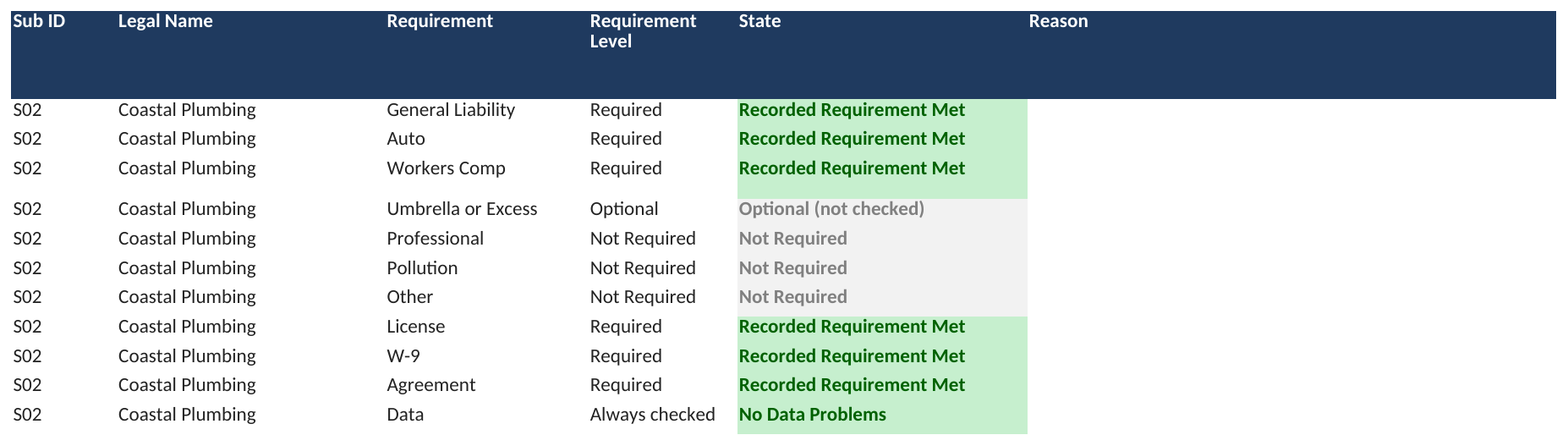
- Open Requirement Status. The Workers Comp row for S02 now reads Recorded Requirement Met, like the rest.
- Open Dashboard.
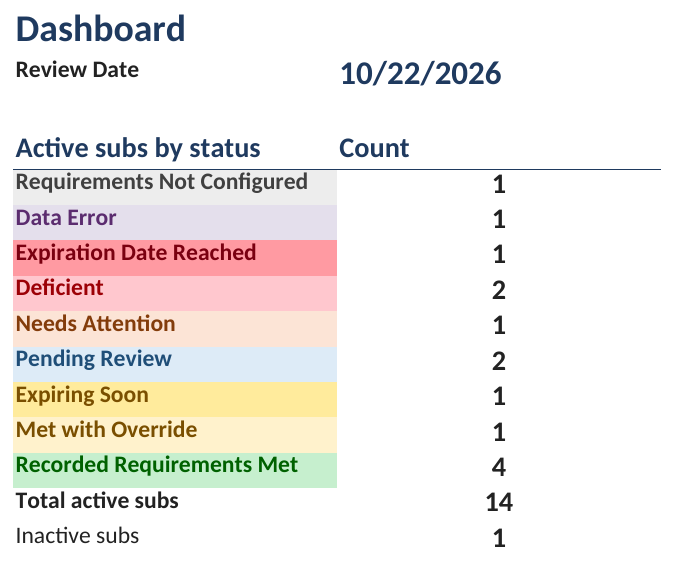
What you should see: Needs Attention drops from 2 to 1 and Recorded Requirements Met rises from 3 to 4. Coastal Plumbing leaves the review queue and the chase list.
Leave WOS Evidence Date blank and the sub shows Pending Review instead: the certificate says there's a waiver, but you don't have the endorsement yet. To put the SAMPLE back, close it without saving.
Google Sheets edition
The Google Sheets edition has the same tabs, checks and statuses as the Excel file. You get it from the PDF in your download, which saves your own private copy to Google Drive.
Make your copy
- Open Subcontractor_Compliance_Tracker_GOOGLE_SHEETS_links.pdf from your Etsy download.
- Sign in to your Google account in your browser.
- Click Make my copy under BLANK workbook (or SAMPLE workbook to explore first).
- Google asks Would you like to make a copy? Click Make a copy.
What you should see: the workbook opens in Google Sheets, named "Copy of Subcontractor Compliance Tracker - BLANK (Google Sheets)", in your own Drive; rename it as you like. Nothing you type is shared with the shop. If a button doesn't open, the PDF also lists both addresses to paste into your browser.
Set your time zone first
In your copy, open File → Settings and pick your time zone, then pick your Company time zone on Start Here. Statuses and expiration dates depend on today's date, so the time zone needs to be yours.
Protected cells
Formula cells are protected with a warning. If Google Sheets warns that you're editing a protected cell, click Cancel unless you really mean to change a formula. As the owner of your copy, you can remove the warning under Data → Protect sheets and ranges.
Questions and limits
How much does it hold? The template edition holds 15 subs, 75 policies, 30 licenses, 12 profiles, 60 coverage rules and 15 overrides. For more subs or more features, a larger edition is paid custom work; message the shop on Etsy.
Can I add rows past the blank ones? Yes. Use Review → Unprotect Sheet (no password), type in the row under the table, then protect the sheet again. Requirement Status still lists only the first 15 subs.
Does it tell me whether a certificate is valid? No. It tracks what you record and flags gaps and expirations. Reviewing the certificate and the endorsements is still your call.
Does it decide who can work or get paid? No. It shows each sub's status against your rules. You make the decision.
What about public projects in Texas? This edition has no jobs, so it doesn't apply the stricter workers comp rule for public projects (Texas Labor Code 406.096; 28 TAC 110.110).
Can I see the hidden columns? Hidden columns on the right of Subs, Coverage and Licenses hold working formulas. To see them, select the columns on either side, right-click and choose Unhide. Changing them can break the workbook.
Does it work on a Mac? Yes: Excel 2019 or later, or Microsoft 365, on Windows or Mac, and free Excel for the web and Google Sheets. Excel 2016 or earlier shows #NAME? errors. No macros.
I opened the SAMPLE and it says Gulf Prairie Builders. That's the fictional sample company. Use the BLANK for your own work.
Still stuck? Message the shop on Etsy with the tab, the row and what you expected to see.