Executor Workbook User Guide
Find your question, then follow the steps: which tab to open, which cell to type in, and what you should see when it worked. Words in bold are the exact tab, column or button names in the workbook.
Published by PoshJosh LLC · Updated October 27, 2026
About this guide
This guide is for Executor Workbook v1.2, in Excel (Windows, Mac or Excel for the web) and Google Sheets. The version is in the file name, for example Executor_Workbook_v1.2_BLANK.xlsx.
Which edition do you have? All three Etsy editions use the same workbook, so this one guide covers all of them. They differ only in the letters and the license.
| Edition | What's in the download | License |
|---|---|---|
| Executor Workbook | BLANK and SAMPLE workbooks, and the START HERE PDF | One estate |
| Executor Workbook + Letters | The same, plus Executor_Letters.docx (12 letter templates) | One estate |
| Executor Workbook, Multi-Estate License | The same as Workbook + Letters | One firm or practice, up to 10 estates a year |
If your edition has no letters, skip The letter templates section.
Color key, on every tab
| Color | What it means |
|---|---|
| Yellow | Inputs. Type here or pick from a dropdown. |
| White | Formulas. They calculate on their own; don't type over them. |
| Orange | Something on that row needs your attention. The Check column says what. |
Your two files. The SAMPLE is filled with a fictional estate, Margaret A. Ellison (sample), so you can see every tab working. Its executor, Daniel Ellison, has collected the bank accounts, sold the house, car and brokerage account, paid most of the debts and made partial distributions. The BLANK is empty and ready for your estate. Try things in the SAMPLE; keep the real estate in the BLANK.
Privacy. Never enter Social Security numbers, full account numbers or passwords. The last 4 digits are enough.
Need help? Message the shop on Etsy. Say which tab and row you were on, what you typed, and what you expected to see. Don't send real names or account details from the estate.
This is a recordkeeping tool, not legal, tax or financial advice, and not a court form. The deadlines that bind you come from your court, your state and the IRS. A balanced accounting shows your records agree with each other; it doesn't prove the estate was administered correctly. Check anything that matters with your attorney and accountant.
Getting around
The workbook has twelve tabs along the bottom. Fill them in roughly in this order: Setup first, then Assets and Beneficiaries, then the Ledger as money moves.
| Tab | What lives there | You type here? |
|---|---|---|
| Start Here | How to start, the color key, capacity and notes | No |
| Setup | Estate details, the estate's bank accounts, state and court periods, federal reminder dates | Yes |
| Dashboard | Four status checks, flagged items by tab, money, tasks and key dates | No |
| Tasks | About 60 steps in six stages, each with a target date | Yes, columns B to J |
| Assets | Everything the decedent owned, how it was titled, and what happened to it | Yes, columns A to L (not E) |
| Debts and Claims | One row per creditor claim and your decision on it | Yes, columns A to F |
| Ledger | Every dollar in or out of an estate account | Yes, columns A to K |
| Beneficiaries | Who receives what, what they've received, and what's still owed | Yes, columns A to E and G |
| Estate Accounting Summary | Charges and credits that must balance, for your attorney | No |
| Bank Rec | Each account matched to its bank statement | Yes, columns C and D |
| Contacts and Notices | A log of every letter, call and notice | Yes, columns A to H |
| Settings | The dropdown lists | Yellow lists only |
On the tabs with long tables, the header row and the first columns stay in place as you scroll, and each header has a filter arrow for sorting and filtering.
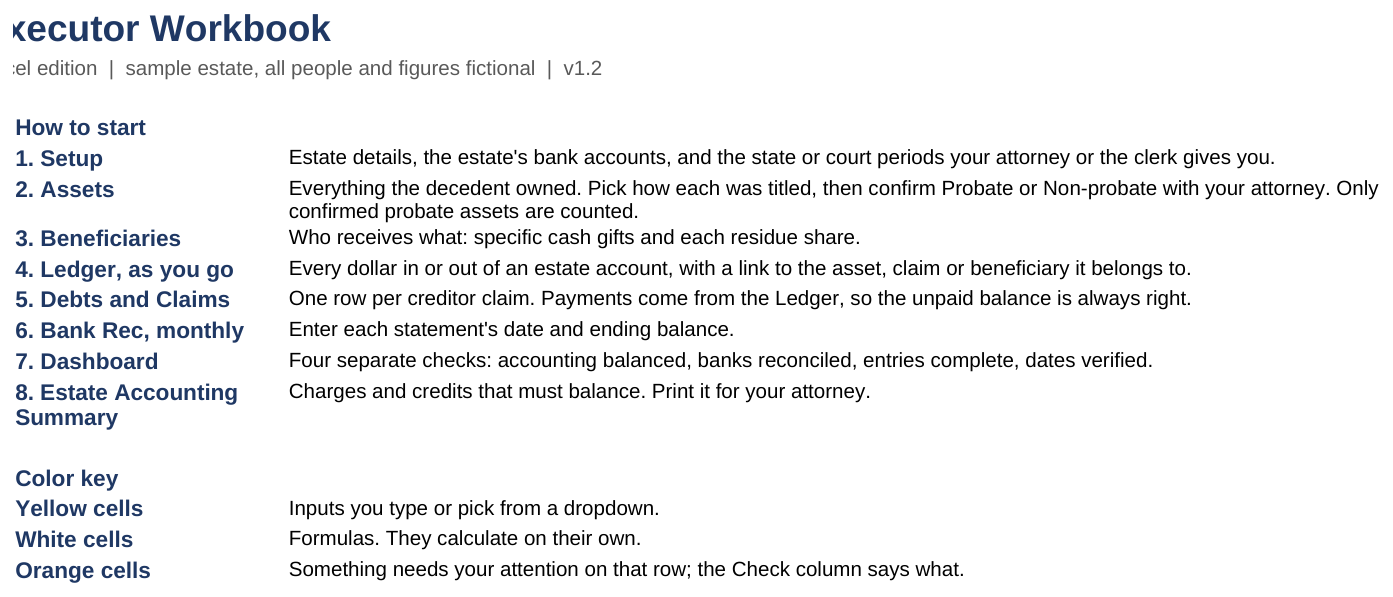
How do I…?
The short path for each common task. The section in the last column has the full steps.
| How do I… | Short path | Section |
|---|---|---|
| Enter the estate's details | Setup → C5 to C17 | First-time setup |
| Add a bank account | Setup → Bank accounts, rows 21 to 26 | First-time setup |
| Get reminder dates for court deadlines | Setup → State and court periods: days and who verified them | First-time setup |
| List what the decedent owned | Assets → next empty row | Assets |
| Record a sale of the house or car | Ledger → an Asset sale line and its Sale cost lines, then Assets → Sold | Selling an asset |
| Pay a bill from the estate account | Ledger → type Expense, with a category | Ledger |
| Move money between estate accounts | Ledger → a Transfer out and a Transfer in with the same Link ID | Ledger |
| Record a creditor's claim | Debts and Claims → next empty row | Debts and claims |
| Pay a claim | Ledger → type Claim payment, Link ID = the Claim ID | Debts and claims |
| Set up who inherits what | Beneficiaries → gift or residue share | Beneficiaries |
| Pay a beneficiary | Ledger → type Cash distribution, Link ID = the Beneficiary ID | Beneficiaries |
| Give a beneficiary an item | Assets → Distributed in kind, with the Beneficiary ID | Assets |
| Match a bank statement | Bank Rec → statement date and ending balance | Bank Rec |
| See what's due next | Dashboard → Next five task dates, or Tasks | Tasks |
| Log a letter or call | Contacts and Notices → next empty row | Contacts and Notices |
| Print the accounting for my attorney | Estate Accounting Summary → File → Print | Estate Accounting Summary |
| Fix an orange cell | Read the Check column on that row | When a cell turns orange |
| See one claim go from flagged to paid | SAMPLE → CL-03 → decide, pay, mark the task Done | Walk through the SAMPLE |
No match. Try a shorter word, or message the shop on Etsy.
First-time setup
Setup takes about fifteen minutes: open the BLANK, fill in Setup, and save. Have the death certificate, the letters from the court, and the last statement for each bank account in front of you.
Open the right file
- In Excel on Windows or Mac, open Executor_Workbook_v1.2_BLANK.xlsx. For Google Sheets, see Google Sheets edition below.
- If a yellow bar says Protected View, click Enable Editing. The numbers show either way, but dropdowns only work once editing is on.
- Save it under your own name, for example Estate of J Smith.xlsx.
For Excel for the web, upload the file to your OneDrive first, then open it from there.
Estate details
- Open the Setup tab.
- Fill in the yellow cells in column C:
| Cell | What to enter | Example |
|---|---|---|
| C5 Decedent's name | Full name | Margaret A. Ellison |
| C6 Date of death | From the death certificate | 2/12/2026 |
| C7 to C10 State, County, Court, Case number | From the court papers | Texas |
| C11 Executor or administrator | Your name | Daniel Ellison |
| C12 Date letters were issued | The date on your letters testamentary or letters of administration | 3/16/2026 |
| C13 Estate tax year-end | A month-end within 12 months of death; ask your tax professional | 12/31/2026 |
| C14 to C16 | Yes, No or Not sure for each question | Yes |
| C17 Accounting period end | The last day the accounting should cover. Leave blank to use today | 10/31/2026 |
What you should see: the Check cells in column D stay blank, and Accounting period end used (C18) shows your date, or today's.
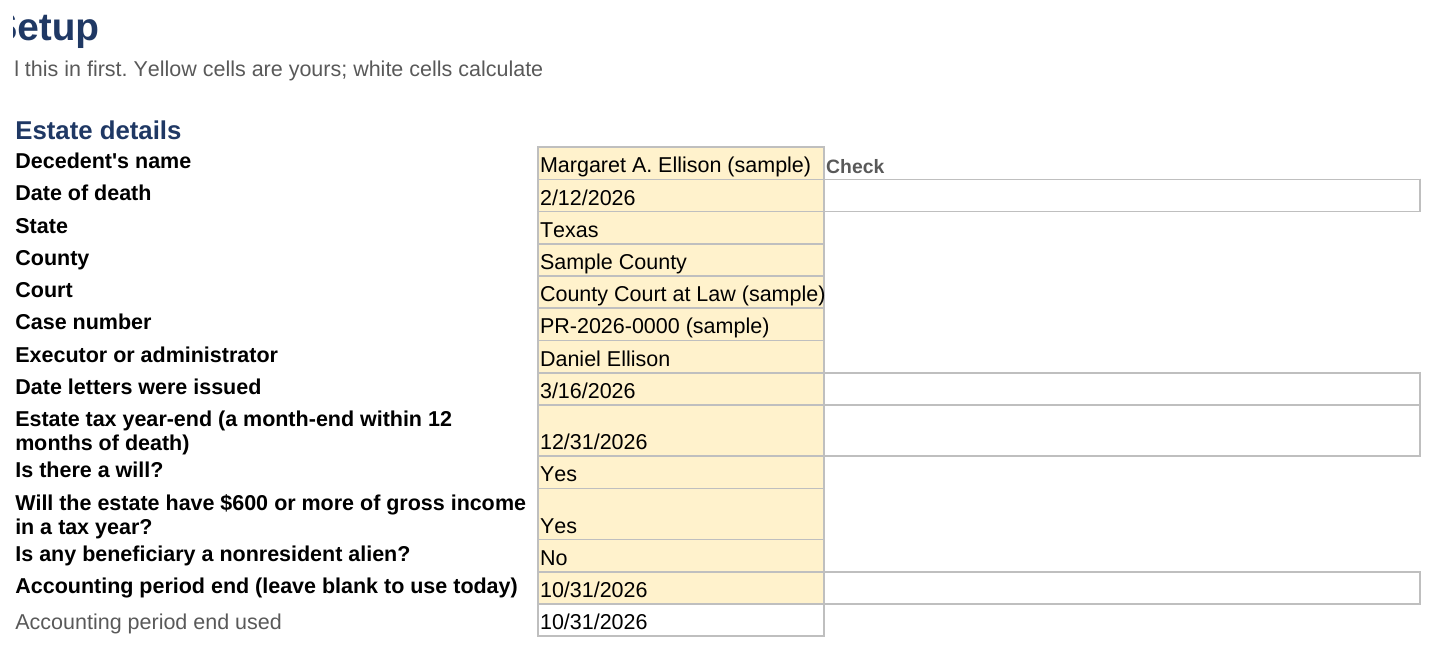
The questions in C15 and C16 decide what the note next to First Form 1041 says. Not sure is a fine answer; the note then tells you to ask your tax professional.
Bank accounts
List every account the estate controls, up to six, in rows 21 to 26. That includes the decedent's own accounts that you'll close, as well as the estate account you open. The Account ID (ACC-1 to ACC-6) is filled in for you.
| Column | What to enter | Example |
|---|---|---|
| C Institution and account type | Bank and type of account | Example Bank, estate checking |
| D Last 4 digits only | Never the full number | 3333 |
| E Belongs to | Decedent (an account in their name) or Estate (one you opened) | Estate |
| F Opening date | The date of death for the decedent's accounts; the opening date for an estate account | 3/20/2026 |
| G Opening balance | The balance on the opening date. 0 for a new account | 0 |
| H Linked asset ID | For the decedent's accounts only: the account's Asset ID on Assets | A-001 |
A decedent's account appears twice on purpose: once on Assets as something the decedent owned, and once here as an account you can move money out of. Give it the same balance in both places. Its disposition on Assets is Collected as cash.
What you should see: the Check cell in column I stays blank. In the SAMPLE, ACC-1 and ACC-2 are the decedent's checking and savings, linked to A-001 and A-002, and ACC-3 is the estate checking account.

State and court periods
Probate deadlines differ by state and sometimes by county, so the workbook never fills them in for you. Ask your attorney or the probate clerk, then enter each one in rows 30 to 33:
- Starts from (date) (column C): the date the period counts from, such as the letters date or the date notice was published.
- Days (column D): the number of days in the period.
- Verified by (column E): who gave you the number, for example Attorney J. Ruiz. Verified on (column F) is the date they told you.
What you should see: Reminder date (column G) shows the date, and the same date appears under Key dates and on the Dashboard. Until both the days and Verified by are filled, it says Not set.
The Claim response window (row 33) has no start date, because it counts from each claim's received date. Its days fill the Respond by column on Debts and Claims.
The SAMPLE's periods say SAMPLE ONLY, not real law. They are made up; never copy them.
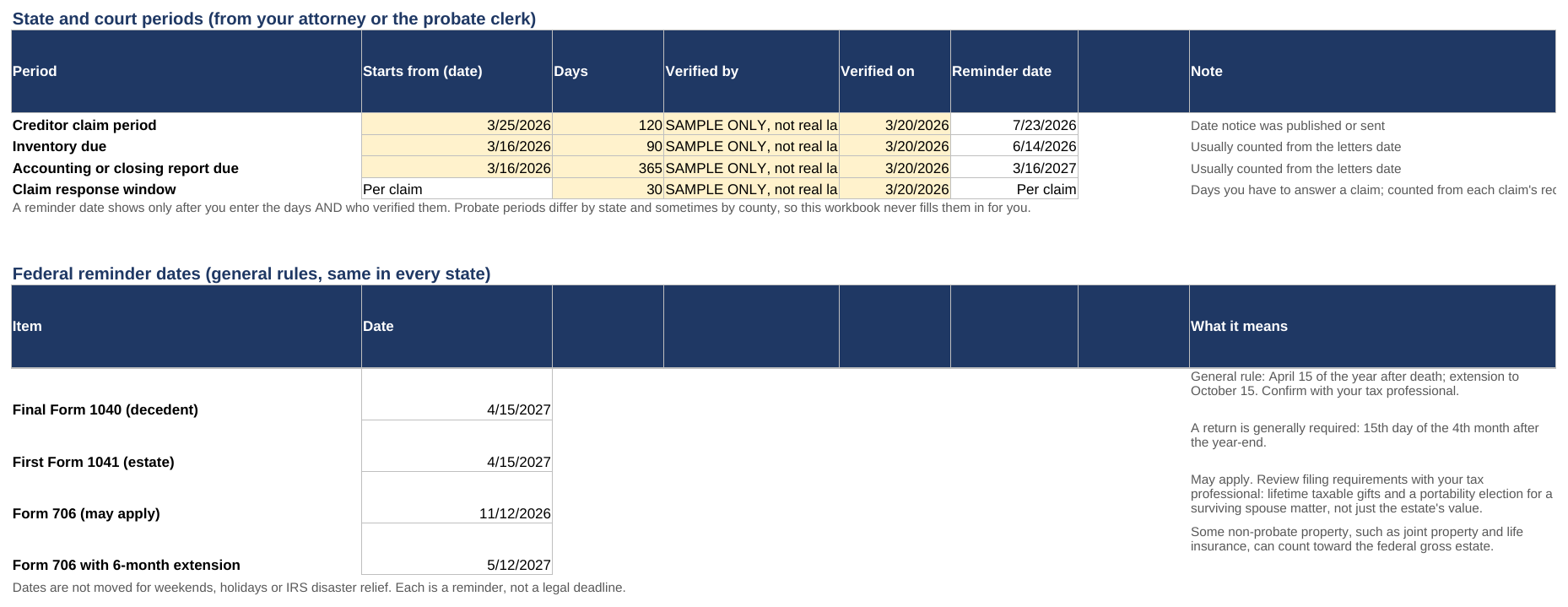
Federal reminder dates
Rows 39 to 42 calculate on their own from the date of death and the estate tax year-end: the final Form 1040, the first Form 1041, and Form 706 with and without its extension. The note beside each says what it means. These are general rules. They aren't moved for weekends, holidays or IRS disaster relief, so confirm each with your tax professional.
Assets
List everything the decedent owned, one row per asset, in rows 5 to 104. Include things that pass outside probate, such as life insurance; the workbook keeps them on record but leaves them out of the accounting.
Add an asset
- Open Assets and go to the first empty row.
- Fill the yellow columns:
| Column | What to enter | Example |
|---|---|---|
| A Asset ID | Your own ID. Each must be unique | A-003 |
| B Description | What it is; last 4 digits only for accounts | House, 412 Elm St |
| C Category | Pick from the dropdown | Real estate |
| D How titled | Pick how it was owned | Decedent's name alone |
| F Confirmed class | Probate, Non-probate or Needs review, once your attorney confirms | Probate |
| G Confirmed by (who, when) | Who confirmed it | Attorney, 3/20 |
| H Date-of-death value | Value on the date of death, from a statement or appraisal | 185,000 |
| I Disposition | What happened to it (see below) | Sold |
| J Sale or distribution date | When it was sold or handed over | 8/14/2026 |
| K Gross sale price | Sold assets only: the price before costs | 192,000 |
| L In-kind recipient | Distributed in kind only: the Beneficiary ID | B-02 |
What you should see: Suggested class (column E) fills in from How titled, and the Check cell (column U) asks you to confirm the class. Once column F is filled and the other details are complete, the Check cell goes blank.
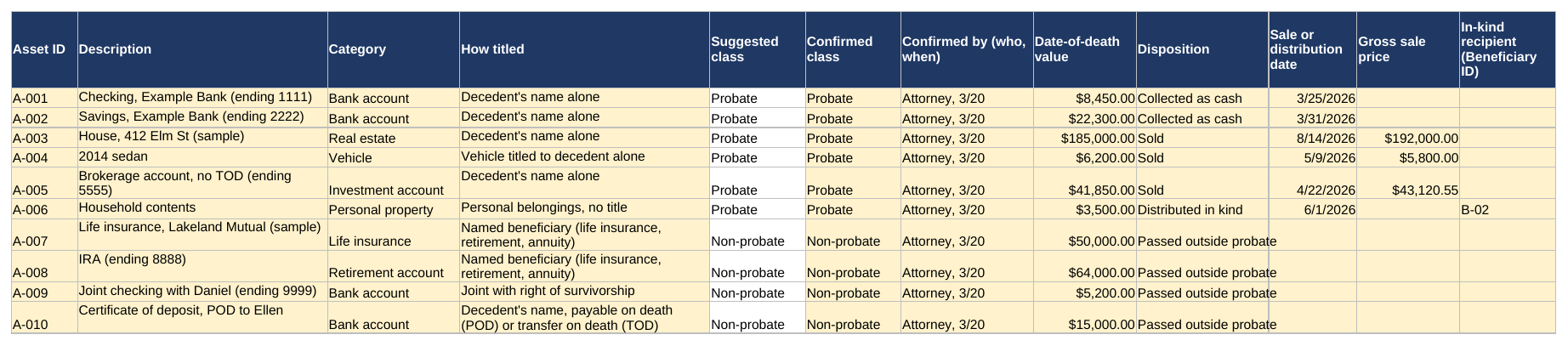
Suggested class is only a hint. Only the class you confirm in column F is counted. Needs review stays orange until you replace it, because community property, business interests and anything you're unsure of need your attorney's answer.
Dispositions
| Disposition | Use it when | Also needed |
|---|---|---|
| Held | The estate still has it | Nothing |
| Sold | It was sold | Sale date, gross price, and the sale lines in the Ledger |
| Distributed in kind | A beneficiary received the item itself | Date and the Beneficiary ID in column L |
| Collected as cash | It's a bank account you moved into the estate | The account listed on Setup, linked to this Asset ID |
| Passed outside probate | Non-probate assets: life insurance, POD accounts, joint accounts | Nothing |
What the white columns mean
| Column | Shows |
|---|---|
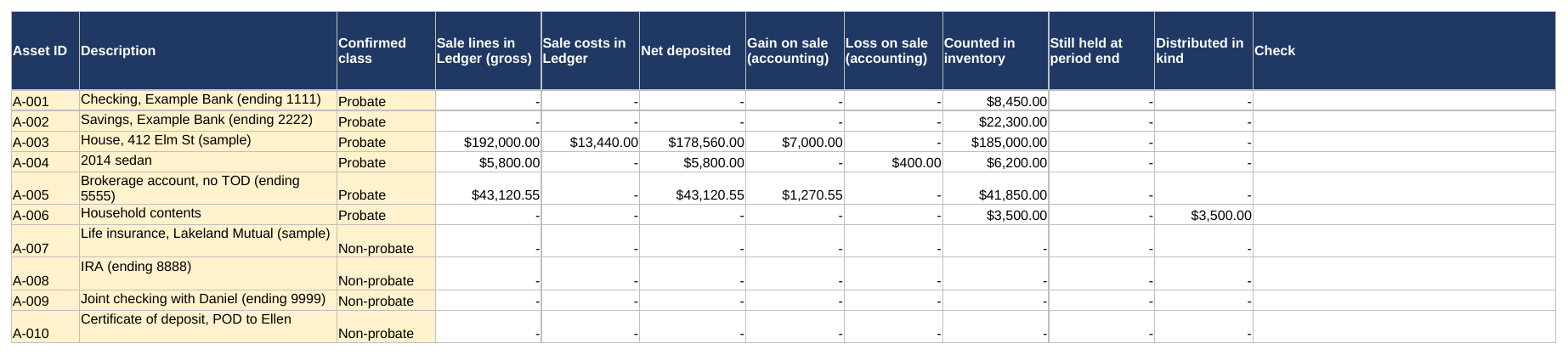
| Sale lines in Ledger (gross), Sale costs in Ledger, Net deposited | The Ledger lines linked to this Asset ID |
| Gain on sale and Loss on sale | Gross price compared with date-of-death value. An accounting figure, not taxable gain or loss |
| Counted in inventory | The date-of-death value, if the asset is confirmed Probate |
| Still held at period end and Distributed in kind | Where the asset ended up, at its inventory value |
Ledger
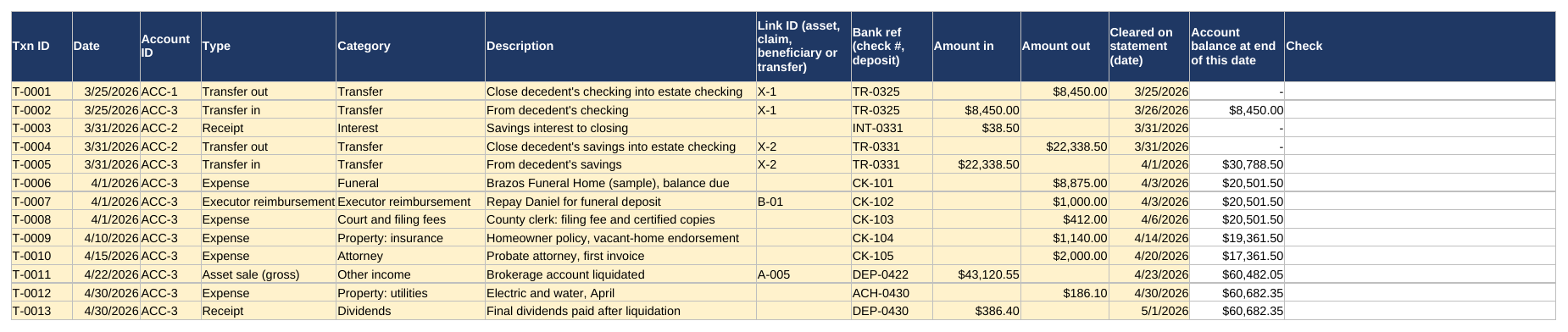
Record every dollar that goes into or out of an account on Setup, one line each, in rows 5 to 504. Enter it when it happens, or from each bank statement.
Add a line
| Column | What to enter | Example |
|---|---|---|
| A Txn ID | Your own ID. Each must be unique | T-0010 |
| B Date | The date of the transaction | 4/15/2026 |
| C Account ID | Pick the account from Setup | ACC-3 |
| D Type | Which way the money went (see below) | Expense |
| E Category | Required for an Expense; useful for everything | Attorney |
| F Description | What it was | Probate attorney, first invoice |
| G Link ID | The asset, claim, beneficiary or transfer it belongs to | (blank for most expenses) |
| H Bank ref | Check number or deposit reference | CK-105 |
| I Amount in or J Amount out | One or the other, always positive | 2,000 |
| K Cleared on statement | The date it cleared the bank, from the statement | 4/20/2026 |
What you should see: Account balance at end of this date (column L) shows that account's balance at the end of the day, and the Check cell (column M) stays blank.
Types
Amounts are always positive. The Type says which way the money went.
| Type | Money | Link ID |
|---|---|---|
| Receipt | In | None. Interest, dividends, refunds, other income |
| Asset sale (gross) | In | The Asset ID |
| Transfer in | In | The transfer's Link ID |
| Expense | Out | None; pick a Category |
| Sale cost | Out | The Asset ID |
| Claim payment | Out | The Claim ID |
| Executor reimbursement | Out | Optional; the SAMPLE uses the executor's Beneficiary ID |
| Transfer out | Out | The transfer's Link ID |
| Cash distribution | Out | The Beneficiary ID |
Move money between accounts
A transfer between two estate accounts is neither income nor expense. Enter two lines with the same Link ID, for example X-1:
- A Transfer out from the account the money left.
- A Transfer in to the account it reached, for the same amount.
In the SAMPLE, T-0001 and T-0002 close the decedent's checking (ACC-1) into the estate checking (ACC-3), linked by X-1.
Selling an asset
At a closing, the bank sees one net deposit, but the accounting needs the gross price and the costs separately.
- Enter the gross price as an Asset sale (gross) line, with the Asset ID as the Link ID.
- Enter each cost taken out at closing as a Sale cost line, with the same Asset ID and the same Bank ref.
- On Assets, set the disposition to Sold and enter the sale date and the same gross price.
What you should see: on Assets, Net deposited equals what reached the bank, and the Check cell stays blank. In the SAMPLE, the house (A-003) sold for $192,000.00 with $13,440.00 of closing costs, so $178,560.00 was deposited.

Lines dated after the Accounting period end on Setup stay in the Ledger but are left out of the Estate Accounting Summary until the period end moves past them.
Debts and claims
Enter each claim a creditor makes against the estate, one per row, in rows 5 to 64. Payments come from the Ledger, so the unpaid balance is always right.
- Open Debts and Claims and go to the first empty row.
- Fill the yellow columns: Claim ID (A, for example CL-04), Creditor (B), Received date (C) and Amount claimed (D).
- When you and your attorney decide, pick the Decision (E): Pending, Allowed in full, Allowed in part or Rejected. For Allowed in part, enter the Amount allowed in F.
- Pay it from the Ledger: a Claim payment line with the Claim ID as the Link ID.
What you should see: Allowed amount, Paid to date (Ledger) and Unpaid allowed balance fill in, and Status moves from Awaiting decision to Unpaid, Part paid or Paid.
Respond by (column H) is the received date plus the Claim response window from Setup. It says Not set until that window is verified. If the date passes with the claim still Pending, the row turns orange.

Beneficiaries
Enter each person or charity that receives something under the will, in rows 5 to 24.
| Column | What to enter | Example |
|---|---|---|
| A Beneficiary ID | Your own ID. Each must be unique | B-01 |
| B Name and C Relation or role | Who they are | Daniel Ellison, Son, executor |
| D Specific cash gift | A set dollar amount the will gives them | 5,000 |
| E Residue share | Their percentage of what's left after everything else | 33.33% |
| G Approved final amount (total) | Leave blank until you and your attorney agree the final figure |
What you should see: Estimated residue share (column F) is their share of the Residue base, and Still owed (column L) is what they're entitled to less what they've received. To the right, Residue shares total must show 100%; if it doesn't, the cell beside it turns orange.

How the estimate works. The Residue base is total charges less disbursements, losses and specific cash gifts. Each residue beneficiary's estimate is their share of it, and the last residue beneficiary on the list takes any leftover cent. The estimate moves every time you pay a bill, so it's a guide, not a figure to pay from. Once you and your attorney agree the final amounts, type them in column G; Entitled then uses that figure instead.
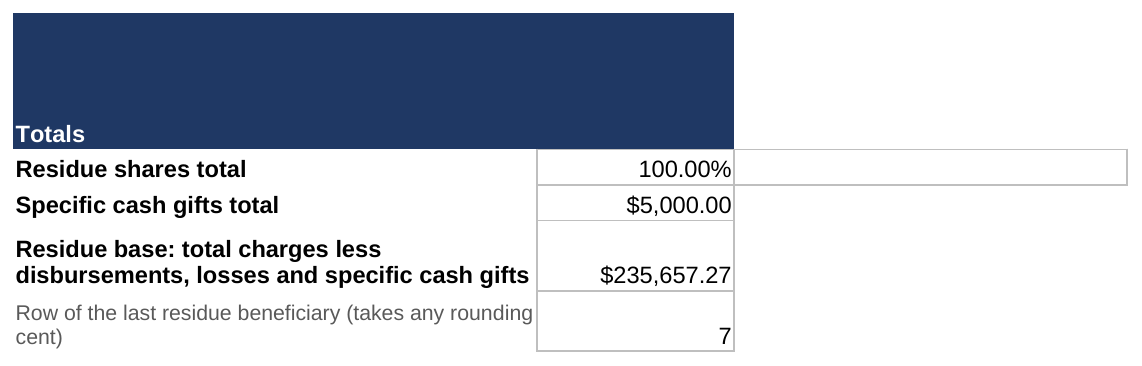
What counts as distributed. Cash comes from Cash distribution lines on the Ledger linked to the Beneficiary ID. Items come from Assets marked Distributed in kind with that ID in column L, at their date-of-death value. In the SAMPLE, Ellen received $70,000.00 in cash and the $3,500.00 household contents.
Bank Rec
Once a month, match each account to its bank statement.
- Mark each Ledger line that appears on the statement with its Cleared on statement date (column K).
- On Bank Rec, enter the Statement date (column C) and Statement ending balance (column D) for each account. Accounts and institutions fill in from Setup.
What you should see: Status (column K) says Reconciled. If it says Off by an amount, the row turns orange.
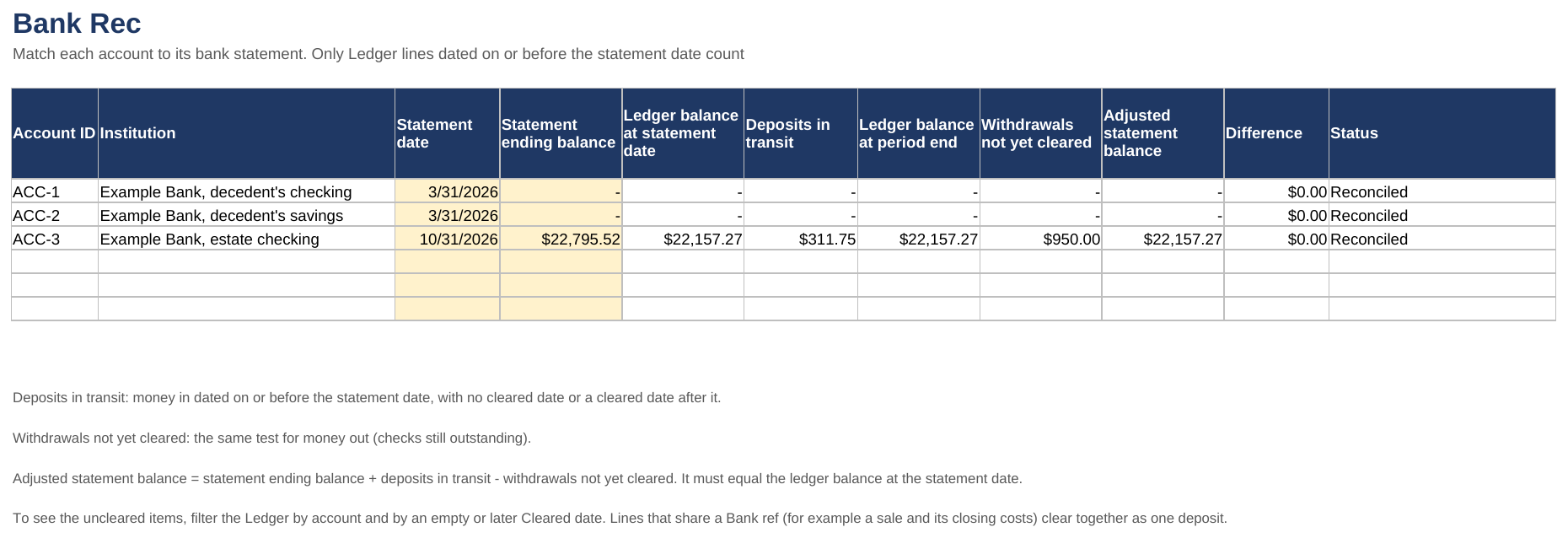
How it matches. Deposits on the Ledger that haven't cleared by the statement date are Deposits in transit; checks that haven't cleared are Withdrawals not yet cleared. The statement balance plus deposits in transit, less withdrawals not yet cleared, must equal the Ledger balance at the statement date. In the SAMPLE, the October statement shows $22,795.52; the $311.75 refund hadn't arrived and the $950.00 CPA check hadn't cleared, so both sides come to $22,157.27.
Lines that share a Bank ref, such as a sale and its closing costs, clear together as one deposit, so give them the same cleared date.
When Off by shows, look for a Ledger line with the wrong amount, date or account, or a missing cleared date. To list the uncleared lines, filter the Ledger by Account ID and by an empty Cleared on statement date.
Tasks
Tasks lists about 60 steps in six stages, from 1 First days to 6 Distribute and close. Each has a target date counted from a key date on Setup.
- As you finish a task, set Status (column H) to Done and type the Done date (column I).
- Set tasks that don't apply to Not needed.
- Use Notes (column J) for anything you want to remember.
What you should see: open tasks with a target date in the past turn orange with Overdue. The Dashboard shows the next five target dates.
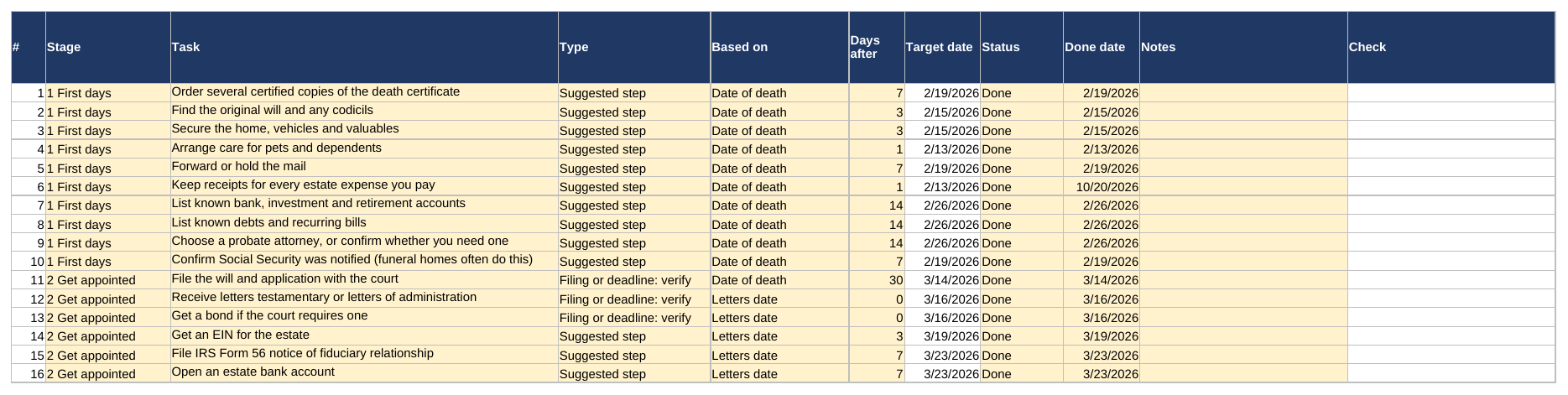
| Column | What it means |
|---|---|
| Type | Filing or deadline: verify marks a filing or deadline; confirm its real date with your attorney or tax professional. Suggested step is a good habit, not a requirement |
| Based on and Days after | The key date the target counts from, and how many days after it. Negative days count back |
| Target date | Not set until that key date exists on Setup |
The list is yours to edit: change a task's wording, its key date or its days, or type a new task over one you don't need. Tasks that mention a letter number match the letter templates.
Contacts and Notices
Log every letter, call and notice, one per row, in rows 5 to 104: Organization (A), Contact (B), Category (C), Letter used (D), Date sent (E), Method (F), Reply or result (G) and Certified copies sent (H).
What you should see: the Check cell (column I) stays blank. It turns orange if a date sent has no method, or a method has no date.

Letter used lists the 12 letter templates by number, plus Other or no letter. Counting Certified copies sent helps you know when to order more death certificates.
The log is a record of what you sent. It isn't proof that a legal notice requirement was met; ask your attorney what your state requires.
Estate Accounting Summary
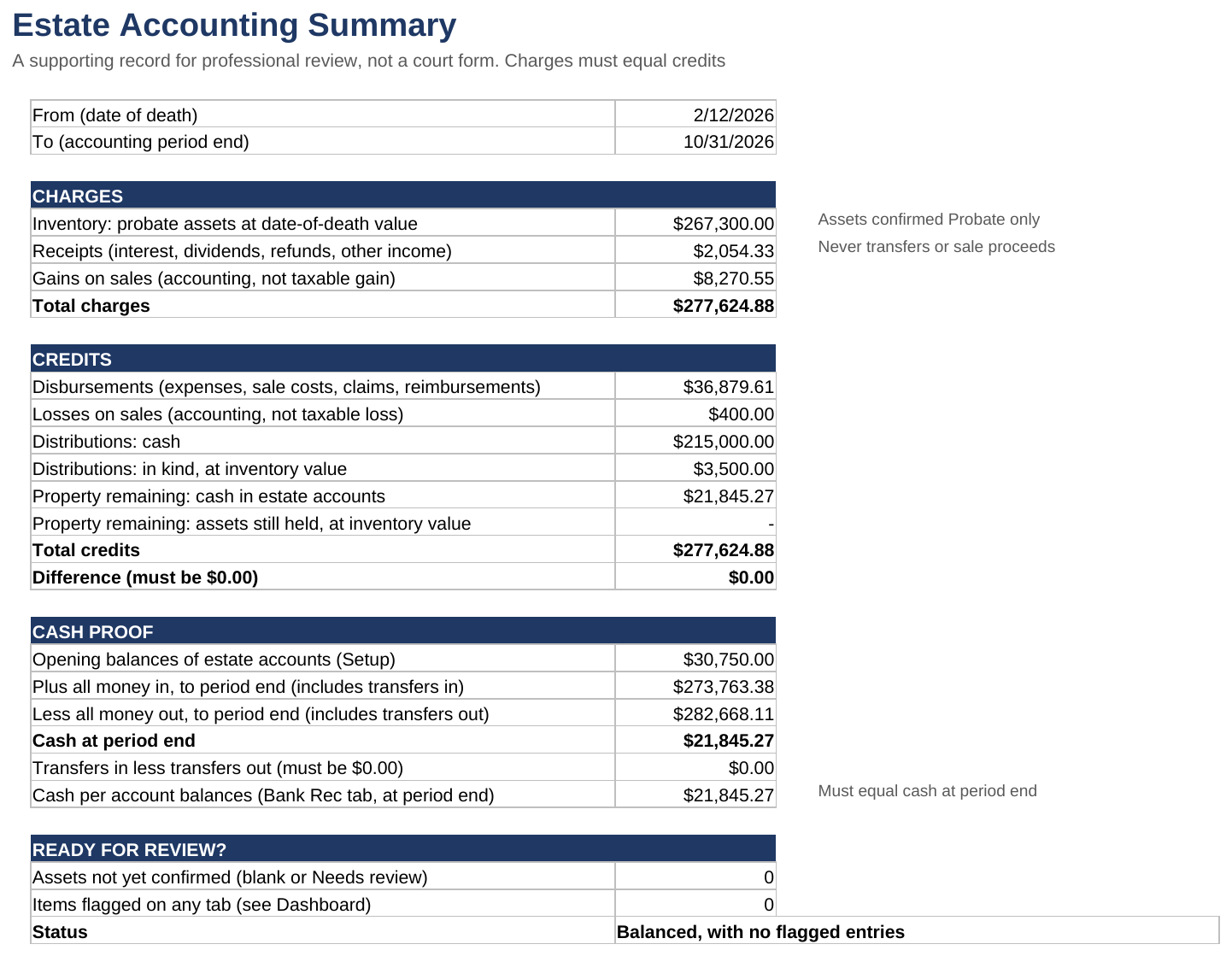
The Estate Accounting Summary is one printable page that shows where everything the estate had went. Nothing on it is typed. Give it to your attorney as a supporting record; it isn't a court form.
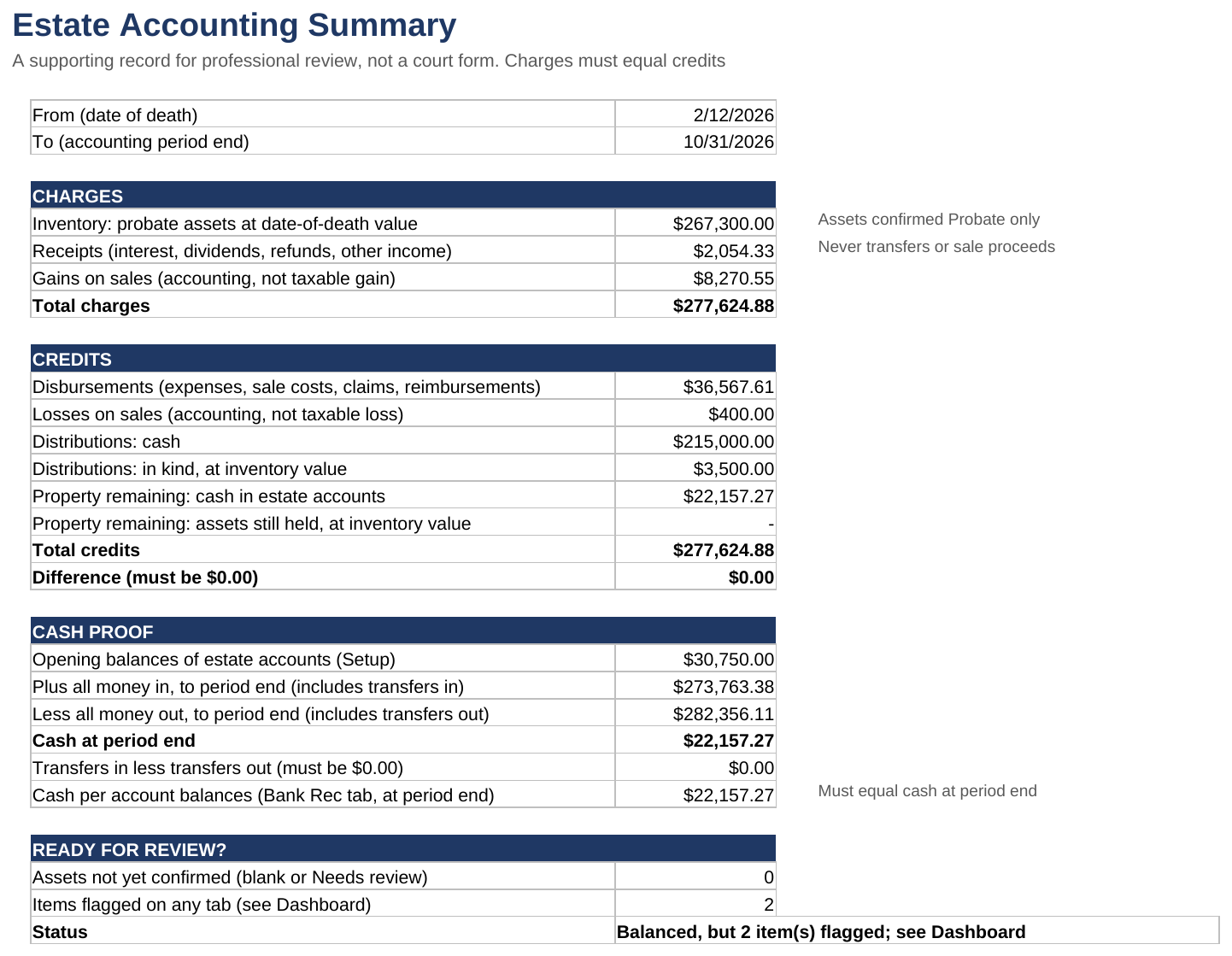
| Section | What it shows | SAMPLE |
|---|---|---|
| From and To | The date of death and the Accounting period end used on Setup | 2/12/2026 to 10/31/2026 |
| Total charges | What you're responsible for: probate inventory, receipts and gains on sales | $277,624.88 |
| Total credits | Where it went: disbursements, losses, distributions, and what's left | $277,624.88 |
| Difference | Charges less credits. Must be $0.00; it turns orange if not | $0.00 |
| Cash at period end | Opening balances plus all money in, less all money out | $22,157.27 |
| Cash per account balances | The same figure from Bank Rec; must match | $22,157.27 |
| Status | Whether it balances and whether anything is still flagged | Balanced, but 2 item(s) flagged; see Dashboard |
Below that, Disbursements by category breaks down the money paid out, using your categories on Settings.
To print, open the tab and choose File → Print. It's set to fit one Letter page.
If the Difference isn't $0.00, the usual causes are a probate asset with no disposition, a sale whose gross price doesn't match the Ledger, or a transfer with only one side. Check the orange cells on Assets and Ledger first.
Dashboard
The Dashboard is the one-screen view of where the estate stands. Nothing on it is typed.
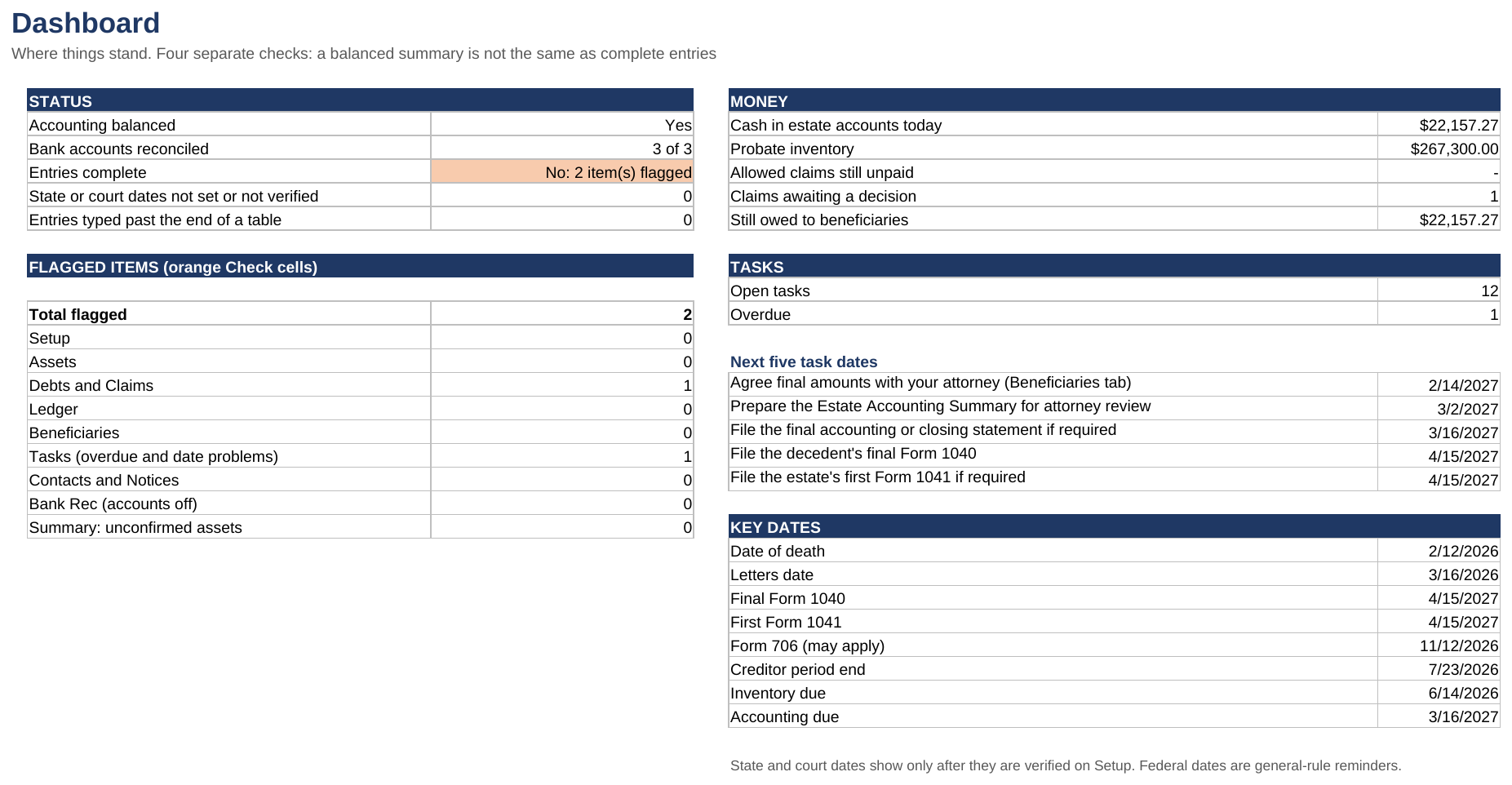
The STATUS box has four separate checks, because a balanced accounting isn't the same as complete records:
| Check | Means | SAMPLE |
|---|---|---|
| Accounting balanced | The Summary's Difference is $0.00 | Yes |
| Bank accounts reconciled | Accounts showing Reconciled on Bank Rec | 3 of 3 |
| Entries complete | No orange Check cells anywhere | No: 2 item(s) flagged |
| State or court dates not set or not verified | Periods on Setup still showing Not set | 0 |
Entries typed past the end of a table counts anything typed below a table's grey end band, which the workbook doesn't count. It should always be 0.
FLAGGED ITEMS shows which tab each orange cell is on. MONEY shows cash today, the probate inventory, unpaid allowed claims, claims awaiting a decision, and what's still owed to beneficiaries. TASKS shows open and overdue tasks and the next five target dates, and KEY DATES repeats the dates from Setup.
Cash in estate accounts today counts every Ledger line, including any after the accounting period end. The Summary only counts lines up to that date.
Walk through the SAMPLE
Follow one claim from flagged to paid and see the whole workbook respond. Use the SAMPLE file; nothing you change there touches your own estate.
The SAMPLE opens with two orange cells, and both come from the same unfinished job. CL-03, a $312.00 bill from Lakeside Imaging (sample), is still Pending though its response date, 10/15/2026, has passed. And task 40, Record a decision on every creditor claim, is still In progress and overdue. The Dashboard says Entries complete: No: 2 item(s) flagged.
- Open Debts and Claims and find CL-03 in row 7. Its Check cell (column L) reads Response date passed with no decision.

- Click E7, the Decision cell, and pick Allowed in full.
What you should see: the orange is gone. Allowed amount and Unpaid allowed balance show $312.00, and Status says Unpaid. On the Dashboard, Claims awaiting a decision drops from 1 to 0 and Allowed claims still unpaid shows $312.00.

- Open Ledger and go to row 38, the first empty row. Enter the payment: Txn ID T-0034, Date 10/31/2026, Account ID ACC-3, Type Claim payment, Category Creditor payment, Description Lakeside Imaging (sample), paid in full, Link ID CL-03, Bank ref CK-117, and Amount out 312. Leave Cleared on statement blank; the check hasn't cleared yet.
What you should see: the Check cell stays blank and Account balance at end of this date shows $21,845.27.

- Go back to Debts and Claims.
What you should see: Paid to date (Ledger) shows $312.00, the unpaid balance is gone, and Status says Paid.

- Open Tasks and find task 40 in row 44, Record a decision on every creditor claim. Set Status to Done and Done date to 10/31/2026.
What you should see: Overdue is gone from its Check cell.

- Open Dashboard.
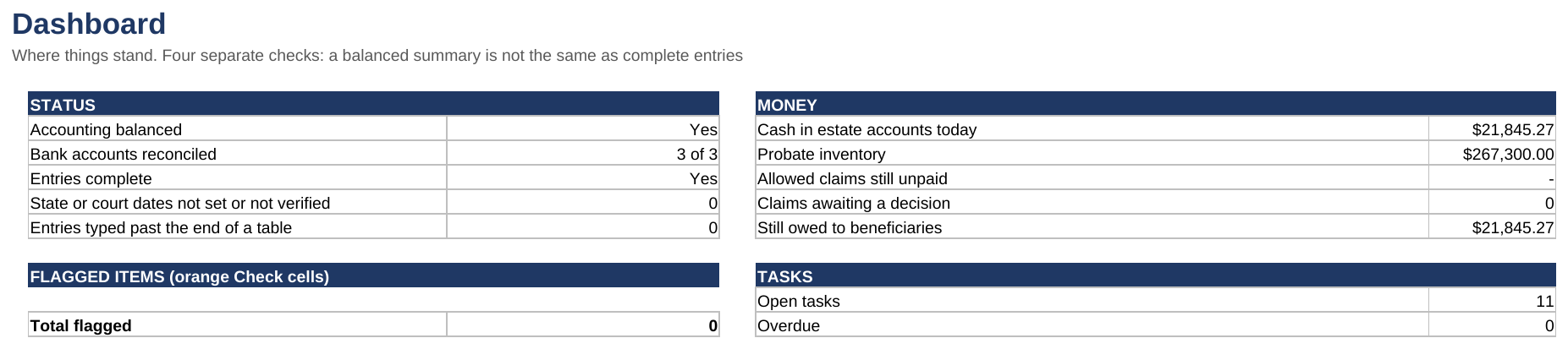
What you should see: Entries complete says Yes, and Total flagged goes from 2 to 0. Cash in estate accounts today and Still owed to beneficiaries both go from $22,157.27 to $21,845.27. Open tasks goes from 12 to 11 and Overdue from 1 to 0. Accounting balanced still says Yes and Bank accounts reconciled still says 3 of 3.
- Open Estate Accounting Summary.
What you should see: Disbursements goes from $36,567.61 to $36,879.61 and Property remaining: cash in estate accounts from $22,157.27 to $21,845.27. Total charges and Total credits both stay at $277,624.88, so the Difference stays $0.00. Status now reads Balanced, with no flagged entries.
- Open Bank Rec.
What you should see: ACC-3 is still Reconciled. The new check hasn't cleared, so Withdrawals not yet cleared goes from $950.00 to $1,262.00, and both sides now come to $21,845.27.

On Beneficiaries, each child's Estimated residue share also drops by $104.00, one third of the $312.00, because paying a debt leaves less to share.
That's the pattern for the whole workbook: record the decision where it belongs, move the money on the Ledger with a link, and the totals, the reconciliation and the checks follow. To put the SAMPLE back, close it without saving.
When a cell turns orange
An orange Check cell means something on that row needs correcting, and the message says what. Fix it and the cell goes blank. The Dashboard counts every orange cell, by tab.
On Setup (column D and column I)
| Check message | How to fix it |
|---|---|
| Date of death needed / Must be a date | Type a date, such as 2/12/2026 |
| Before the date of death | Letters, year-end and period end must be on or after the date of death |
| More than 12 months after death | Pick an estate tax year-end within 12 months of death |
| Must be the last day of a month | The year-end must be a month-end, such as 12/31/2026 |
| Enter the institution | An account row has details but no institution in column C |
| Opening balance needed (0 for a new account) | Type the opening balance, or 0 |
| Last 4 digits only | Type only the last 4 digits of the account number |
| Pick Decedent or Estate | Pick who the account belongs to |
| Link the decedent's account to its Asset ID | Type the account's Asset ID from Assets in column H |
| Asset ID not on the Assets tab | Add the account on Assets, or correct the ID |
| Asset linked to two accounts | Each asset links to one account; correct one of them |
| Opening balance should equal the asset's date-of-death value | Make the balance here and the value on Assets match |
On Assets (column U)
| Check message | How to fix it |
|---|---|
| Asset ID needed / Duplicate Asset ID | Give each asset its own ID |
| Pick how it is titled, then confirm the class | Pick How titled, then Confirmed class |
| Confirm the class (suggested: …) | Confirm Probate or Non-probate with your attorney and pick it in column F |
| Needs review: confirm the class with your attorney | Replace Needs review with Probate or Non-probate |
| Date-of-death value needed / Use whole cents | Type the value, to the cent |
| Pick a disposition | Pick what happened to it, or Held |
| A probate asset can't pass outside probate | Pick another disposition, or recheck the class |
| Non-probate: pick Passed outside probate | Non-probate assets always pass outside probate |
| Sold: enter the sale date and gross price | Fill columns J and K |
| Sold: no Asset sale line in the Ledger links to this ID | Add the Asset sale (gross) line on the Ledger with this Asset ID |
| Gross price doesn't match the Ledger sale line | Make column K and the Ledger line agree |
| Ledger has sale lines but the asset isn't marked Sold | Set the disposition to Sold, or fix the Link ID on the Ledger |
| In kind: enter the recipient and date | Fill columns J and L |
| Recipient not on the Beneficiaries tab | Add the beneficiary, or correct the ID |
| Collected as cash: link this asset to an account on Setup | List the account on Setup with this Asset ID in column H |
| Linked on Setup: disposition should be Collected as cash | Set the disposition to Collected as cash |
On Debts and Claims (column L)
| Check message | How to fix it |
|---|---|
| Claim ID needed / Duplicate Claim ID | Give each claim its own ID |
| Received date needed / Amount claimed needed | Fill columns C and D |
| Allowed in part: enter an amount up to the claim | Type the allowed amount in F, no more than the claim |
| Payment recorded but the claim isn't allowed | Record the decision, or fix the Link ID on the Ledger |
| Paid more than the allowed amount | Check the Ledger payments linked to this claim |
| Response date passed with no decision | Record a decision in column E |
On Ledger (column M)
| Check message | How to fix it |
|---|---|
| Txn ID needed / Duplicate Txn ID | Give each line its own ID |
| Date needed / Dated before the date of death | Type the transaction date |
| Account ID must match Setup (ACC-1 to ACC-6) | Pick the account from the dropdown |
| Set up this account on the Setup tab first | Fill in that account's row on Setup |
| Pick a type | Pick from the dropdown |
| Enter amount in OR amount out, not both / Enter an amount | One amount per line, in the right column |
| Amounts are positive; the type sets the direction | Remove the minus sign |
| Use whole cents | Round to the cent |
| This type is money in / This type is money out | Move the amount to the other column, or change the type |
| Pick a category | Expenses need a category |
| Link to an Asset ID / Link to a Claim ID / Link to a Beneficiary ID | Type the matching ID in Link ID |
| Linked asset isn't marked Sold | Set the asset's disposition to Sold on Assets |
| Give both sides of the transfer the same Link ID | Type the same Link ID on the Transfer out and the Transfer in |
| A transfer needs one Transfer out and one Transfer in with this Link ID | Add the missing side, or use a new Link ID for each transfer |
| Transfer amounts don't match | Make both sides the same amount |
| Cleared date must be a date / Cleared before the transaction date | Check the date from the statement |
| Balance below zero on this date: a deposit may be missing or misdated | Find the deposit that should come first, or check the dates |
On Beneficiaries (column M, and beside the totals)
| Check message | How to fix it |
|---|---|
| Beneficiary ID needed / Duplicate Beneficiary ID | Give each beneficiary their own ID |
| Distributed more than the approved or estimated amount | Check the distributions, or enter the approved final amount |
| Residue shares must total 100% | Correct the shares in column E |
On Tasks (column K)
| Check message | How to fix it |
|---|---|
| Overdue | Do it and mark it Done, or mark it Not needed |
| Done date entered: set Status to Done | Set Status to Done |
| Done date must be a date / Done before the date of death | Check the date |
On Contacts and Notices (column I)
| Check message | How to fix it |
|---|---|
| Organization needed | Type who it went to |
| Pick how it was sent / Enter the date sent | Fill both Date sent and Method |
| Date sent must be a date | Type a date |
Settings and capacity
Settings holds the dropdown lists. Yellow lists are yours to edit; white lists are used by formulas and can't change.
| List | You can |
|---|---|
| Ledger categories | Rename or add, up to 25. They become the rows of Disbursements by category |
| How titled and Suggested class | Rename or add titling types, up to 16, each with its suggested class: Probate, Non-probate or Needs review |
| Asset categories | Rename or add, up to 14 |
| Contact method | Rename the six methods |
If you rename a category after using it, Ledger lines with the old name drop out of Disbursements by category on the Summary, and its total no longer matches, until you re-pick them.
Capacity. One file holds 60 tasks, 100 assets, 60 claims, 500 ledger lines, 20 beneficiaries, 6 bank accounts and 100 contacts, which is enough for most estates. Each table ends with a grey band. Anything typed below it isn't counted and shows on the Dashboard as Entries typed past the end of a table. If an estate needs more, message the shop on Etsy.
The letter templates
Workbook + Letters and Multi-Estate editions. Executor_Letters.docx has 12 one-page letters for routine requests and notices, with an index on the first page that says who each goes to and what to attach.
| # | Letter | # | Letter |
|---|---|---|---|
| 1 | Notice of death, financial account | 7 | Pension or annuity notice |
| 2 | Date-of-death valuation request | 8 | Insurance claim forms request |
| 3 | Notice of death, creditor | 9 | Cancel or transfer service |
| 4 | Request for claim documentation | 10 | Informational update to beneficiaries |
| 5 | Deceased notice, credit bureau | 11 | Distribution cover letter and receipt |
| 6 | Final pay and benefits request | 12 | Request to close account and release funds |
Send a letter
- Open Executor_Letters.docx in Word, or make your Google Docs copy from the START HERE PDF.
- Go to the letter and read its blue Before you send box.
- Replace every [BRACKETED FIELD]. Fields such as [DECEDENT'S NAME], [DATE OF DEATH] and [CASE NUMBER] match the labels on Setup, so copy them across.
- Delete the blue box, then print or save as PDF.
- Log it on Contacts and Notices: the date, the method, and the letter's number in Letter used.
Use only the last 4 digits of any account or Social Security number. None of these letters is a court filing, a statutory notice to creditors, a claim objection, a waiver or a release. Your attorney may want different wording.
Google Sheets edition
The Google Sheets edition works the same as the Excel file. You get it from the START HERE PDF in your download, which saves your own private copy to Google Drive.
Make your copy
- Open the START HERE PDF from your Etsy download and go to page 2.
- Sign in to your Google account in your browser.
- Click Make my copy under BLANK workbook (or SAMPLE workbook to explore first). If your edition includes the letters, there's a third button for Letters in Google Docs.
- Google asks Would you like to make a copy? Click Make a copy.
What you should see: the workbook opens in your own Google Drive; rename it after the estate. Nothing you type is shared with the shop. If a button doesn't open, the PDF also lists each address to paste into your browser.
Set your time zone
Go to File → Settings in your copy and pick your time zone. The workbook uses today's date for overdue tasks, response dates and the accounting period end, so the time zone needs to be yours.
Protected cells
Formula cells show a warning if you type over them. Click Cancel unless you really mean to change a formula. The warning only guards against accidents; as the owner of your copy, you can remove it under Data → Protect sheets and ranges.
Sharing
Share your copy only with named people, such as your attorney or accountant. Never use Anyone with the link.
Your license
Your license is in the START HERE PDF.
| Edition | What it covers |
|---|---|
| Executor Workbook and Executor Workbook + Letters | The administration of one estate. Anyone working on that estate may use it |
| Multi-Estate License | One firm or practice, any number of staff, up to 10 estates in any rolling 12 months, with a fresh BLANK copy for each estate. Estates only; trusts aren't covered |
With any edition, you may share completed records with the estate's beneficiaries, court, attorney and accountant. Please don't resell, share or post the blank files. Need more than 10 estates a year? Message the shop on Etsy for a quote.
Questions and limits
Does it tell me what my deadlines are? No. Federal dates are general-rule reminders. State and court dates show only after you enter the days and who verified them, because they differ by state and county. Nothing in the workbook is a legal deadline.
Does it decide whether an asset goes through probate? No. Suggested class is a hint from how the asset was titled. Only the class you confirm with your attorney counts.
Are the gains and losses taxable? Not necessarily. They're measured against date-of-death value for the accounting. Your tax professional works out the taxable figures.
Can I file the Estate Accounting Summary with the court? It's a supporting record, not a court form. Courts can require their own schedules and format, so give it to your attorney.
Can I change the layout or a formula? In Excel, use Review → Unprotect Sheet (no password), make the change, then protect the sheet again. In Google Sheets, see Protected cells above. Changes to formulas are at your own risk.
Does it work on a Mac? Yes: Excel 2019 or newer for Mac, or Microsoft 365. It also works in free Excel for the web and Google Sheets.
Do I need macros? No. The workbook has none.
I opened the SAMPLE and it says Margaret A. Ellison. That's the fictional sample estate. Every person, business, address and figure in it is made up, including the state periods. Use the BLANK for a real estate.
Still stuck? Message the shop on Etsy with the tab, the row and what you expected to see.